 Folio
FolioPDF tools
Merge, split and organise PDFs on Android
Combine several PDFs into one, split a long one apart, pull out the pages you need and shrink the file. All on your phone, with no upload.

- Works offline
- No account
- Documents never uploaded
How to merge PDFs in Folio
- 1
Open Tools
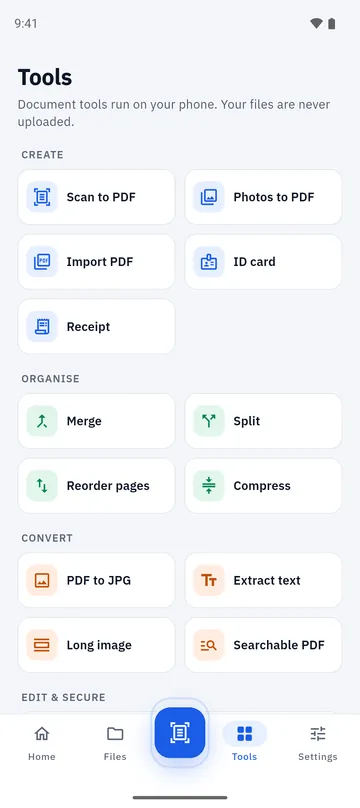
Tap the Tools tab and choose Merge, Split, Reorder pages or Compress.
- 2
Choose your files
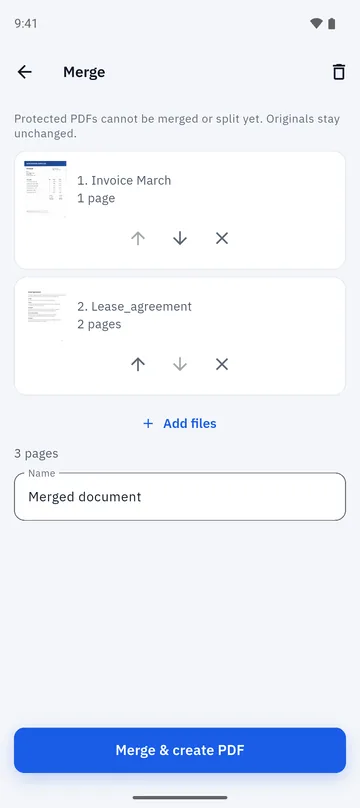
Pick documents from your Folio library, or add PDFs from your phone with Add files.
- 3
Set the order
Move a file up or down, remove one you added by mistake, and give the result a name.
- 4
Create the PDF
Tap Merge & create PDF. The result is a new document; the originals are left as they were.
Merge PDFs into one file
Send one PDF instead of five attachments. Add as many files as you need, set the order, and Folio builds a single document. PDF pages are copied across, so text and vector graphics stay sharp rather than being turned into pictures.
- Add files from your library or from your phone’s storage.
- See the page count of each file before you merge.
- Name the merged document before you create it.
Split, extract, reorder and compress
The Tools tab is the shortcut to everything that reshapes a document.
- Split a PDF into separate files, or extract just the pages you want.
- Reorder, rotate, delete and add pages, including blank pages and pages from another PDF.
- Compress a PDF to make it smaller for email or upload forms.
- PDF to JPG and Long image export your pages as pictures.
Good to know
- Your original files are never changed. Every tool saves a new copy.
- Password-protected PDFs can be opened in the viewer, but cannot yet be merged, split, edited or reordered.
- Tools run on your phone, so very large files take longer on older devices.
- A short rewarded video may play before you share, print or open the result in another app.
Folio is free, with a few ads and a one-time Remove Ads purchase. Details are on the home page.
Questions about merging and splitting PDFs
How do I merge PDF files on Android?
Open Folio, tap Tools, choose Merge, pick the files, set the order and tap Merge & create PDF. You get one new PDF and the originals stay as they were.
How do I split a PDF into separate files?
Use Split in the Tools tab to divide a document into separate PDFs. To keep only some pages, extract them.
Are my PDFs uploaded when I merge or split them?
No. Merge, split, reorder and compress all run on your phone. Folio has no document server.
Can I reduce the size of a PDF?
Yes. Compress makes a smaller copy of a PDF. How much smaller it gets depends on what is inside the file.
Can I merge a password-protected PDF?
Not yet. You can open a protected PDF in the viewer by entering its password, but merging, splitting and editing it are not supported yet.
Do merged PDFs keep their text?
Yes. PDF pages are imported as pages, not flattened into images, so selectable text and vector artwork are kept.
More you can do in Folio
Scan to PDF
Scan one page at a time, check the edges, clean up with filters and create a PDF.
Learn more about Scan to PDF →PDF editor
Add text, pen strokes, highlights, images and signatures to a PDF page.
Learn more about PDF editor →Extract text (OCR)
Read the text in a scan, copy or share it, and make a searchable PDF.
Learn more about Extract text (OCR) →