 Folio
FolioPDF editor
Edit PDFs on your phone: text, pen, highlight, images
Fill in a form, highlight a clause, add a note or drop in a stamp. Folio’s editor adds to the page and saves a new copy, so your original is safe.

- Works offline
- No account
- Documents never uploaded
How to edit a PDF in Folio
- 1
Open the PDF
Open a document from your library or import a PDF, then tap Edit PDF.
- 2
Pick a tool
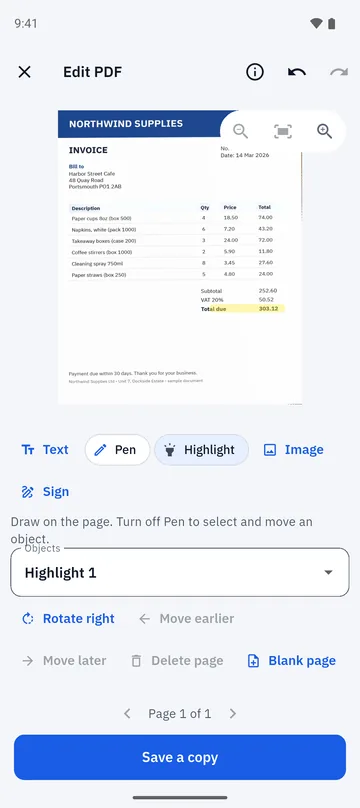
Choose Text, Pen, Highlight, Image or Sign, then tap or draw on the page.
- 3
Adjust the page
Rotate, move, delete or reorder pages, and add a blank page or pages from another PDF.
- 4
Save a copy
Tap Save a copy. Your original is never changed; the edited version is stored as a new document.
Add to the page
Everything you add is an object you can select, move, resize and delete until you save.
- Text for notes, names and filled-in fields.
- Pen for freehand marks, and Highlight for emphasis.
- Image for logos, stamps and photos.
- Sign to place a saved signature.
Organise pages and keep control
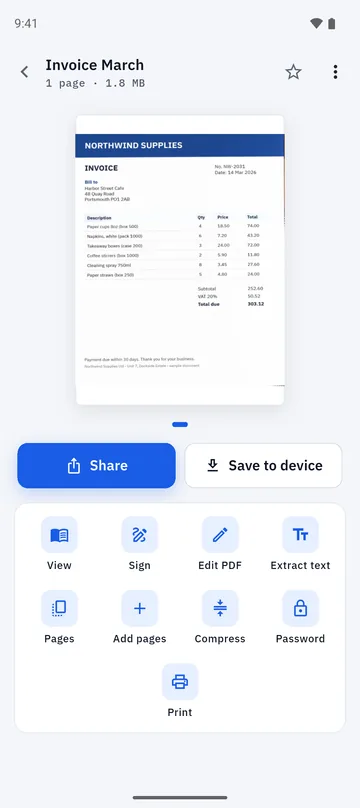
The document screen puts every action in one place, from pages and compression to a password for the PDF you export.
- Add pages, reorder, rotate and delete them.
- Protect a PDF you export with a password of your choice.
- Open and read PDFs in the built-in viewer, including password-protected ones when you enter the password.
- Keep documents in folders, star favourites and search by title or by text.
Good to know
- The editor adds to a page. It does not rewrite the existing text of a PDF.
- Password-protected PDFs open in the viewer, but cannot yet be edited or have their pages changed.
- Edits are saved as a new copy. Your original file is never modified.
- A short rewarded video may play before you share, print or open the edited PDF in another app.
Folio is free, with a few ads and a one-time Remove Ads purchase. Details are on the home page.
Questions about the PDF editor
Can I change text that is already in a PDF?
No. Folio’s editor adds text, drawings, highlights, images and signatures on top of a page. It does not rewrite text that is already part of the PDF.
Does editing change my original PDF?
No. Folio saves your edits as a new copy and keeps the original untouched.
Can I highlight text in a scanned PDF?
Yes. The Highlight tool marks an area of the page, which works on scans and on regular PDFs alike.
Can I fill in a PDF form?
You can place text over the fields with the Text tool and add a signature and the date.
Is my PDF uploaded while I edit it?
No. Editing happens on your phone and Folio does not upload documents.
Can I add pages from another PDF?
Yes. In the editor you can add a blank page or pages from another PDF, then reorder them.
More you can do in Folio
Sign PDF
Draw, type or photograph your signature, tap to place it, and add the date.
Learn more about Sign PDF →Merge and split PDF
Combine PDFs, split them, extract pages, reorder, rotate and compress.
Learn more about Merge and split PDF →Scan to PDF
Scan one page at a time, check the edges, clean up with filters and create a PDF.
Learn more about Scan to PDF →